
Pico Park Death Tracker: The Free Score Tracker Every Co-op Squad Needs
If you’ve ever played Pico Park with a full squad, you know the routine. Someone knocks a teammate off a ledge, the whole level resets, and within thirty seconds three different people are shouting “who did that?!” By the end of a session nobody actually remembers who caused the most game overs — you just remember that it definitely wasn’t you.
That’s the exact problem this Pico Park death tracker (and score tracker) solves. It’s a free, browser-based scoreboard built specifically for Pico Park and Pico Park 2 co-op sessions — no install, no account, no spreadsheet.
What Is Pico Park?
Pico Park is a cooperative puzzle-platformer from the Japanese indie studio TECOPARK, originally released on Steam in 2016 and later on Nintendo Switch in 2019. Up to 8 players (10 in the Classic Edition) work together on one screen to grab a key and reach the door at the end of each stage — and because levels are built around physics, timing, and teamwork, it’s just as easy to accidentally sabotage a friend as it is to help them. Online multiplayer was added in 2021, and the sequel, Pico Park 2, launched in late 2024 with new World Mode stages and mechanics.
It’s become a go-to party game for exactly this reason: it’s chaotic, it’s funny, and it’s very easy to lose track of who’s actually the problem.

The Problem: Manual Death Counting Ruins the Vibe
Pico Park doesn’t track deaths for you. If your group wants bragging rights (or wants to publicly shame whoever keeps letting go of the rope), someone has to keep score by hand — usually on a sticky note, a phone notes app, or just vibes and arguments. It falls apart fast, especially across a full run of levels.
This has been a recurring request in the Pico Park community for years — players asking for an “after action report” or an automatic death counter so everyone can settle the score without a debate.
Introducing a Free Pico Park Score Tracker
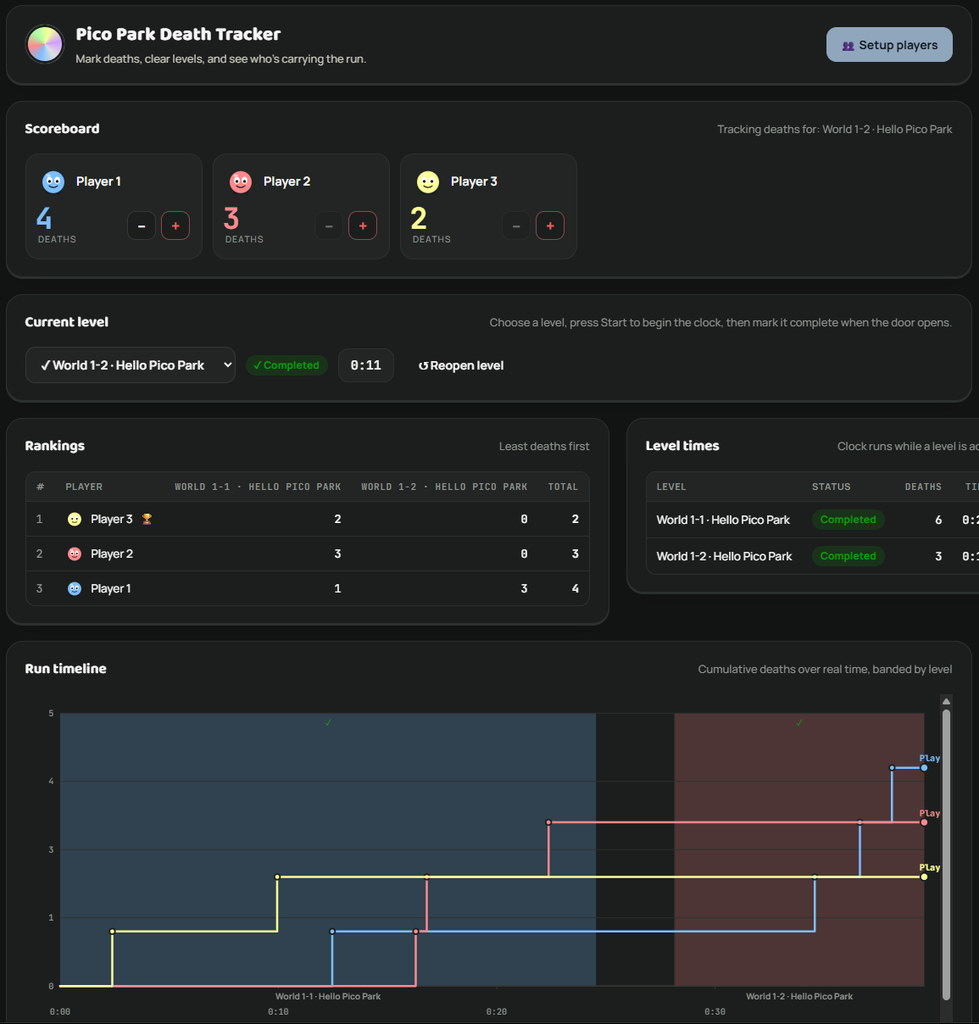
This tool fills that gap. It’s a single self-contained webpage — works on desktop or mobile, nothing to install — built to run alongside your game session:
- Player setup — add up to 8 players, each with a name and a colour, in a few seconds.
- Live scoreboard — a card per player with big +/- buttons to log a death (or a game over) the instant it happens.
- Level dropdown — every official World Mode level pre-loaded, ready to select and start with one click.
- Rankings table — players sorted from fewest to most deaths, broken down level by level, so you can see exactly where things went wrong.
- Level time tracking — how long each level actually took, from start to completion.
- Run timeline chart — a live graph of accumulated deaths over real time, colour-coded by level, so you can watch the chaos unfold as it happens.
How to Use It
- Open the tracker on a laptop, tablet, or phone next to your setup.
- Add each player’s name and pick a colour for them.
- Pick the level you’re about to play from the dropdown and hit Start.
- Tap + every time someone causes a death or game over.
- Mark the level complete when you clear it, then move on to the next one.
- Check the rankings and timeline chart at any point to see who’s really carrying the run.
Why It’s Free (and Where Your Data Goes)
There’s no sign-up and no account. Everything is saved locally in your own browser, so your session data stays on your device between rounds — refresh the page and your roster and progress are still there. It’s built to be the thing you pull up once and reuse every game night.
FAQ
Yes — it tracks deaths, levels, and rankings the same way regardless of which game you’re playing; you’re just logging events manually as they happen on screen.
No. It’s a webpage that runs entirely in your browser. No downloads, no sign-up.
Yes, your setup and current run are saved locally in your browser and will still be there next time you open the page on the same device.
It’s designed to be run from a single shared screen (like a second monitor, tablet, or phone) that one person updates as the group plays — similar to how you’d run a shared scoreboard for game night.
Try It on Your Next Game Night
Open the Pico Park Death Tracker →
Bookmark it, pull it up before your next session, and finally settle who really has the most deaths.